Entradas

Windows services management

Imagen
Wow, it's been a long time since I last updated the blog. Life, you know. OK, today I bring you a very simple library to manage the Windows services you may have created (either with LabVIEW or in another language, it doesn't matter). These VIs allow to install and uninstall the service, as well as running it, stopping it and getting its current status. A lot of extra functionalities could be added if ever needed, you'll see they're extremely easy to use and modify. Download Services LLB (library and class for LabVIEW 2016) The main part of the library is made up of service.lvclass , a LabVIEW class that wraps the provided functions: install, start, stop, get status and uninstall. Maybe using GOOP here is overkill, but it's easier this way, just deploy init and close to create and dispose an instance and call the other VIs in between. This class uses .NET methods inside and as such is only valid for a Windows OS, but we are talking about Windows services her...

Mail subject with non-standard characters

Imagen
I was thinking about good example uses for the Base64 Encoding utility I posted last week, and then I remembered: e-mails! Sending an e-mail from your application is a pretty common task. Let's say your client wants to be automatically informed when some conditions are met in the plant. So you do it, and probably use the Send Email using SMTP Cient.vi that comes with LabVIEW (since LV2013) and allows the use of secure mail servers, as Gmail. So far, so good. But what happens when you put some non-English characters in the subject line? This is usual for us Spanish speakers, and the results are not as intended, but garbage text on the other side. The answer is to use an encoded-word syntax . In this case we'll use Base64 and the VI I uploaded . The change needed in the mail client VI is minimum: Just encode the text in Base64, encapsulate it as indicated, and your subject line will be readable in any mail client, as you can see in the lower image.

Base64 Encoding

Imagen
Long time no see! Today I'm here to talk about Base64 encoding and how to do it in LabVIEW. What is Base64 and what is used for? Base64 is a six-bit based encoding mechanism that uses only printable characters from the ASCII table (lower and upper case letters, numbers, and three more characters, usually "+/="). This means it can be represented in any textual environment, though obviously adds an overhead respect to the original code since two bits of every byte are unused. You will find B64 mainly in mail applications (to send attachments), but lately it's been popular in URLs and HTML too. The concept is to insert small chunks of data directly as B64 text to avoid recurrent callings for files through the web. For example, you can embed an image inside your HTML or CSS file. It's not my intention to delve too deep in this aspect, but for an image tag the resulting HTML code would look like this (let's assume a JPG file): <img src="data:imag...

Alternative dialog box

Imagen
LabVIEW one-button and two-button dialogs are great but present some issues. The first one is permanency: they don't disappear unless the user clicks one button. This can be problematic if you need the code to continue executing even if there's not a human watching. Second, and less serious to an extent, they resize automatically to the text length; that can lead to really big gray boxes in the screen. So here you have an alternative dialog box. The main difference is, even being modal , it closes by itself if the time consumes without user action. In that case, the default value is returned ( true for one-button mode, false for two buttons). You can select the waiting time in seconds (20 by default). Download (VI for LabVIEW 2016) Vertical scrollbar? Only when needed Surely it's a very simple VI, but please consider this piece of code: What we are doing here is to check if a vertical scrollbar is needed. Usually the vertical scrollbar is grayed out if the t...

Uptime

Imagen
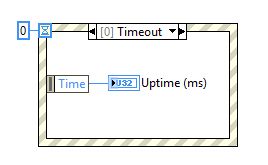
Let's go back to LabVIEW. Have you ever wondered what's the meaning of the "Time" item in an event structure timeout case? Well, it's just the uptime , the time in milliseconds since the computer was started. Download (VI for LabVIEW 2016) So, if you need to recover the uptime you can use a VI just like this, an event structure that immediately closes and returns that value. It's a nice alternative for calculating execution times or, broadly, any instance when you just need relative and not absolute time measurements.

Balance text in web pages

Imagen
Today we'll set aside LabVIEW for a change and try something with JavaScript . Consider these two headings, which one do you think is better? Hopefully you will find the second one more appealing to the eye, as me, since the title lines are nearly balanced. If you are formatting a publication by yourself this is easily achieved adjusting the text by hand, but in a web page is difficult. In fact this was proposed as a CSS standard by Adobe some years ago, as text-wrap: balance property, but W3C didn't adopt it and no web browser that I know of implements it. So we'll have to do it ourselves, and with vanilla JavaScript no less so no external library is needed. The code The concept behind our function is to "shrink" left and right borders around the heading just until the text needs another line, and stop there. So basically: 1) Find number of words and lines in the heading. 2) If balancing can be applied, start shrinking borders. 3) Still the same l...

Required Outputs Wizard

Imagen
It's an old LabVIEW programmer's dream to be able to make VI outputs required, just as can be done with inputs. Some years ago I discovered a way of achieving it, through a deprecated scripting method. I checked with NI staff and they said it was clever but could cause unexpected problems, so I set it aside. But the time goes by and the functionality is still not available, so here we go, the Required Outputs Wizard is yours. I've been using it on and off for a long time and no errors have arisen, even when applying it to connectors with modern data types, such as classes (OOP). But I guess the risk is still there, so be cautious and test it first with unimportant VIs. Download (LLB for LabVIEW 2016) The bowels of the code So, how it works? Launch the top VI in the LLB, you can leave it there running. When a connected front panel indicator is selected, the "REQUIRED" button will be available. Just press it. Yeah, that's all, now your indicator connec...