Entradas

Mostrando las entradas etiquetadas como LabVIEW

Case-insensitive string sorting

Imagen
Today I'm gonna talk about a very simple issue: sorting a string array. In LabVIEW , the default behavior is a case-sensitive sorting. That's to say, "Beta" will be sorted above "alfa", just because upper case letters are considered to be before their lower case counterparts. Obviously, sometimes we'll need a case-insensitive sorting , while not losing the original casing (let's say, when sorting a filenames list). So, what's the fastest and simplest way of achieving it? I'm partial to this one: building a cluster array where the first element is the lower case version of our string, and the second one is the original string. When sorting clusters, LV will do it based on the first element, so after that we just need to extract the second element from each cluster in the array, and it's done! Download (VI for LabVIEW 2016) Incidentally, this VI exposes the Sort 1D Array primitive, that has been hidden on the last LabVIEW versio...

Slider ghost events and how to avoid them

Imagen
One typical UI problem a LabVIEW developer faces is how to prevent an oversupply of events generated by some front panel objects, particularly sliders and knobs. When the user drags the slider, a lot of events with slightly different associated values pile up waiting to be processed. So if each event entails a complex code execution or communication with some equipment, we are wasting time and resources with this "ghost events". As you may know, this is an old problem and any search on NI forums will uncover several workarounds . In my experience, the best approach is to validate the event before processing it. But how? As in the image above, first wait a length of time and then check if the event associated value is still the value in the control. If not, discard (because the final value is still waiting). Sounds simple but some considerations are required: First, the milliseconds to wait (500 in this example) will both filter a higher number of unnecessary events an...

CPU and memory usage

Imagen
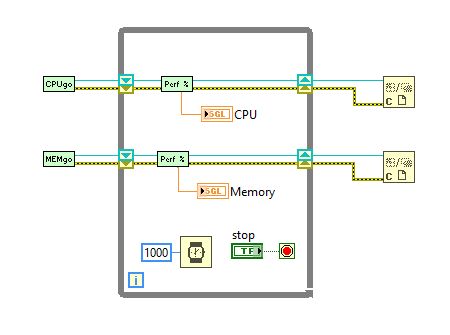
Along the lines of the last post , I'd like to show you a simple .NET way to check CPU and memory usage percentage, a nice asset in resource-consuming applications. Here you have an application example with these VIs: Both are based in performance counters, so use the correct init VI and just ask periodically for the current value, as shown. If any error arises, it usually comes from the constructor, so check the System.PerformanceCounter options and look online for updated values. Download (LLB for LabVIEW 2016) See ya! ;-)

Retrieve CPU temperature

Imagen
Lately I had to check the CPU temperature in a critical acquisition system, and I thought it could be a good thing to share here. I know there are several applications to do this and much more, but getting it from our code allows to react conveniently to any event. Now, IMPORTANT, the VI doesn't work on its own. First you must download the Open Hardware Monitor . Extract OpenHardwareMonitorLib.dll from the zip file and put it in the same folder the VI is located. The objects exposed in it use .NET Framework 2.0 and above, but that shouldn't be a problem in any modern machine. On the other hand, this works only for Windows , obviously. And remember, the application (either an .exe or the LabVIEW IDE) must run with administrator rights (otherwise you'll get error 1172 ). Download (VI for LabVIEW 2016) Now, if you haven't worked with .NET functions in LabVIEW, this can be a good opportunity to familiarize with them. Let's take a look at the code. First we ...

Open folder in file explorer

Imagen
This is an useful snippet I've using for a long time, and still works fine in Windows 10 (though obviously won't in Linux machines). Say you have saved a new data file and you want to show it to the user. Well, this VI does it for you. If the input path is a folder, it just shows it. If it's a file, opens its containing folder and the file appears selected. It's really simple and uses a system call: Here you have it for LabVIEW '16. Download (VI for LabVIEW 2016) When managing files and folders, the function to release the current directory we saw some time ago can also be helpful.

Windows services management

Imagen
Wow, it's been a long time since I last updated the blog. Life, you know. OK, today I bring you a very simple library to manage the Windows services you may have created (either with LabVIEW or in another language, it doesn't matter). These VIs allow to install and uninstall the service, as well as running it, stopping it and getting its current status. A lot of extra functionalities could be added if ever needed, you'll see they're extremely easy to use and modify. Download Services LLB (library and class for LabVIEW 2016) The main part of the library is made up of service.lvclass , a LabVIEW class that wraps the provided functions: install, start, stop, get status and uninstall. Maybe using GOOP here is overkill, but it's easier this way, just deploy init and close to create and dispose an instance and call the other VIs in between. This class uses .NET methods inside and as such is only valid for a Windows OS, but we are talking about Windows services her...

Mail subject with non-standard characters

Imagen
I was thinking about good example uses for the Base64 Encoding utility I posted last week, and then I remembered: e-mails! Sending an e-mail from your application is a pretty common task. Let's say your client wants to be automatically informed when some conditions are met in the plant. So you do it, and probably use the Send Email using SMTP Cient.vi that comes with LabVIEW (since LV2013) and allows the use of secure mail servers, as Gmail. So far, so good. But what happens when you put some non-English characters in the subject line? This is usual for us Spanish speakers, and the results are not as intended, but garbage text on the other side. The answer is to use an encoded-word syntax . In this case we'll use Base64 and the VI I uploaded . The change needed in the mail client VI is minimum: Just encode the text in Base64, encapsulate it as indicated, and your subject line will be readable in any mail client, as you can see in the lower image.

Base64 Encoding

Imagen
Long time no see! Today I'm here to talk about Base64 encoding and how to do it in LabVIEW. What is Base64 and what is used for? Base64 is a six-bit based encoding mechanism that uses only printable characters from the ASCII table (lower and upper case letters, numbers, and three more characters, usually "+/="). This means it can be represented in any textual environment, though obviously adds an overhead respect to the original code since two bits of every byte are unused. You will find B64 mainly in mail applications (to send attachments), but lately it's been popular in URLs and HTML too. The concept is to insert small chunks of data directly as B64 text to avoid recurrent callings for files through the web. For example, you can embed an image inside your HTML or CSS file. It's not my intention to delve too deep in this aspect, but for an image tag the resulting HTML code would look like this (let's assume a JPG file): <img src="data:imag...

Alternative dialog box

Imagen
LabVIEW one-button and two-button dialogs are great but present some issues. The first one is permanency: they don't disappear unless the user clicks one button. This can be problematic if you need the code to continue executing even if there's not a human watching. Second, and less serious to an extent, they resize automatically to the text length; that can lead to really big gray boxes in the screen. So here you have an alternative dialog box. The main difference is, even being modal , it closes by itself if the time consumes without user action. In that case, the default value is returned ( true for one-button mode, false for two buttons). You can select the waiting time in seconds (20 by default). Download (VI for LabVIEW 2016) Vertical scrollbar? Only when needed Surely it's a very simple VI, but please consider this piece of code: What we are doing here is to check if a vertical scrollbar is needed. Usually the vertical scrollbar is grayed out if the t...

Uptime

Imagen
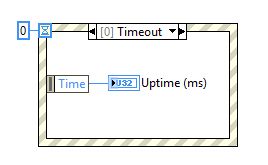
Let's go back to LabVIEW. Have you ever wondered what's the meaning of the "Time" item in an event structure timeout case? Well, it's just the uptime , the time in milliseconds since the computer was started. Download (VI for LabVIEW 2016) So, if you need to recover the uptime you can use a VI just like this, an event structure that immediately closes and returns that value. It's a nice alternative for calculating execution times or, broadly, any instance when you just need relative and not absolute time measurements.

Required Outputs Wizard

Imagen
It's an old LabVIEW programmer's dream to be able to make VI outputs required, just as can be done with inputs. Some years ago I discovered a way of achieving it, through a deprecated scripting method. I checked with NI staff and they said it was clever but could cause unexpected problems, so I set it aside. But the time goes by and the functionality is still not available, so here we go, the Required Outputs Wizard is yours. I've been using it on and off for a long time and no errors have arisen, even when applying it to connectors with modern data types, such as classes (OOP). But I guess the risk is still there, so be cautious and test it first with unimportant VIs. Download (LLB for LabVIEW 2016) The bowels of the code So, how it works? Launch the top VI in the LLB, you can leave it there running. When a connected front panel indicator is selected, the "REQUIRED" button will be available. Just press it. Yeah, that's all, now your indicator connec...

Coerce to Type

Imagen
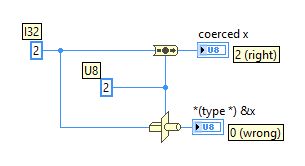
I'm surprised the Coerce to Type primitive hasn't found yet its way to the public front. It was revealed some years ago and since then has proved being a reliable way of converting data types, much better than the classic Type Cast , but it's still not visible in the LabVIEW functions API. Consider the following code example. You're casting an U32 value (2) to U8 (you shouldn't, but shit happens). Type cast just casts it, so the resulting value is 0 (wrong!), but Coerce to Type understands what you are doing and returns 2 (correctly). To use Coerce to Type in your VIs, the easiest way is downloading the VI below into your drive. Download (VI for LabVIEW 2016) Next we're going to place it in the functions palette. So, open any block diagram and click Tools → Advanced → Edit Palette Set . Then select the palette you want to add the VI into (in this case I recommend Programming → Numeric → Data Manipulation ) and click Insert → VI(s) and select the p...

Antenna pointer

Imagen
Now let's get graphic! For satellite applications is always useful to know where to point your antennas. This LLB top VI draws the positions and the azimuth angle over an equirectangular projection , chosen because of its easiness (no coordinates conversion needed), though far north and south latitudes are deformed. Also provided is phi , the angle of incidence, important for asymmetric antennas. For your own calculations you'll find useful calculate azimuth.vi and calculate elevation.vi (also calculate phi.vi for angle of incidence). All of them are included in this LLB. Download (LLB for LabVIEW 2016)

Simple FTP client for LabVIEW

Imagen
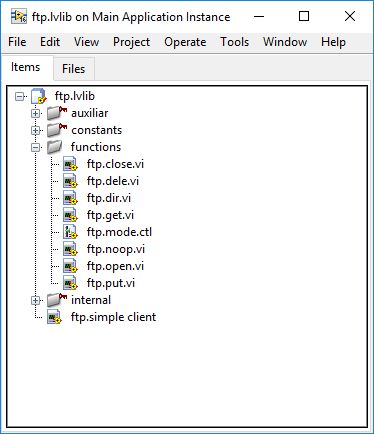
LabVIEW comes with its own nice pack of FTP functions , but some time ago I needed a very low level control over the communication with a particularly stubborn equipment that returned strange codes and list formats. You know, that's the problem with the FTP protocol: it was designed for human interaction and sometimes the automatization can be really hard if the server is not respecting supposed standards. So I developed some very simple VIs to see what were going down there, and now they're in this blog in case anybody needs a simple and direct way of FTP communication. The top-level functions offered are LIST, GET, PUT, DELE and RMD, the basics to manipulate files, and both active and passive modes are allowed. I think their main utility is to see how things go in the TCP chatting between client and server. Download (LLB for LabVIEW 2016) To demonstrate how they work, I have developed a simple FTP client that connects to a FTP server of your choosing and allows to n...

Implode / Explode

Imagen
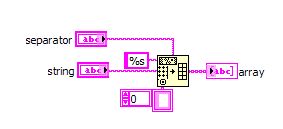
LabVIEW lacks native implode/explode functions for strings, to split a string into an array and vice versa. This is easily feasible thanks to the Spreadsheet String To Array function and its opposite Array to Spreadsheet String , but it's useful having a couple of VIs ready to do the work. Download explode.vi (VI for LabVIEW 2016) The explode function is pretty straightforward, but imploding is a little harder since the parallel function puts a carriage return / line feed at the end of the resulting string, and we need to remove it applying a trim. Trim is not the best function in performance and could add more problems (for example if the last chunk has a white space at the end), so I have implemented an alternative simple for-loop mechanism. Download implode.vi (VI for LabVIEW 2016) Check the code and select the mode you are mor confortable with.

SNMP library for LabVIEW

Imagen
SNMP (Simple Network Management Protocol) is a fairly common protocol for communicating with network equipment. It's fast, lightweight and standardized. Unfortunately it's not quite as simple as its name implies and LabVIEW doesn't support it natively. Some years ago I was in the necessity of using SNMP from a LabVIEW system to control some hardware. I started looking for already implemented solutions and found a library developed by Mark Yedinak (great work!). It was useful since it demonstrated it could be done and how, but I needed more control over the operations, so I had to read the protocol down to the low level bytes and implement what I need by myself. Yeah, pretty hard and with time constraints no less. Anyway, here it is. Download (Library in LLB file for LabVIEW 2016) See the examples folder to grasp the basic use. Probably you'll need no more than these sets of VIs to send and retrieve data and to get traps sent by your equipment. To integrate ...

Release current directory

Imagen
This is not mine, it's a tip I found years ago in a LabVIEW forum and still works like a charm (thanks to the genious that got it!). When the user selects a file to work with (signal data you want to analyze, for example) your LabVIEW application "grabs" its path, so you can't delete it or its directory, or unmount the unit if you're using an external drive, even if you are not reading that file anymore and you clear any path controls. But we can use Kernel32.dll method SetCurrentDirectoryA to release it (obviously, this only works in Windows systems). No downloadable code today, it's better if you link the call library function node by yourself, so you're sure it finds the dll. You can find more info about this method here: SetCurrentDirectory function at MSDN .

Variant to XML

Imagen
Converting to XML format is a good way of exporting data in a standard, human-readable way. I have used it to pass and receive data from other languages, for example, or if you need to dump data to a log file. As you may know, LabVIEW includes its own functions for converting to and from XML, called Flatten To XML and Unflatten From XML . Unfortunately, it's a raw conversion that just gives a node with the data type and two child nodes, name and value. So, to find a field you must recover first all the name nodes, locate the one you need and then find its value sibling. Too crude for a lot of scenarios: So I developed my own library to do this conversion in a more convenient way. Check the differences in the next image: As you can see the field names are now used as tag names, resulting in a shorter and cleaner XML text. The reverse conversion (from XML to LabVIEW data) is shown in the bottom of the image, and works the same. In the block diagram, these functions are u...

CIDR to netmask

Imagen
To begin with, something basic but useful, a LabVIEW VI for converting CIDR suffix to a standard IP mask. As you know, in CIDR format the number after the IP indicates the bits that address uses. If you need to convert to a traditional subnet mask, this VI comes handy. So, a CIDR of 24 will return a 255.255.255.0 mask, 28 is 255.255.255.240, etc. Pretty simple, but a lot of applications demand netmasks in this format. Download (VI for LabVIEW 2016) LabVIEW still only supports IPv4 , so I haven't delved into the complexities of IPv6 (we'd need a U128 data type for that).